
AWS Cost Explorer is a useful place to start when you need to understand AWS spend. It can show which services changed, which accounts are driving the bill, and where usage is trending.
The hard part comes after the report.
A lot of teams still handle cost work by hand. Someone opens the console, exports a screenshot, drops a chart in Slack, or updates a spreadsheet for leadership. The next week the same questions come back: Which service changed? Which team owns it? Is this expected? Who is going to fix it?
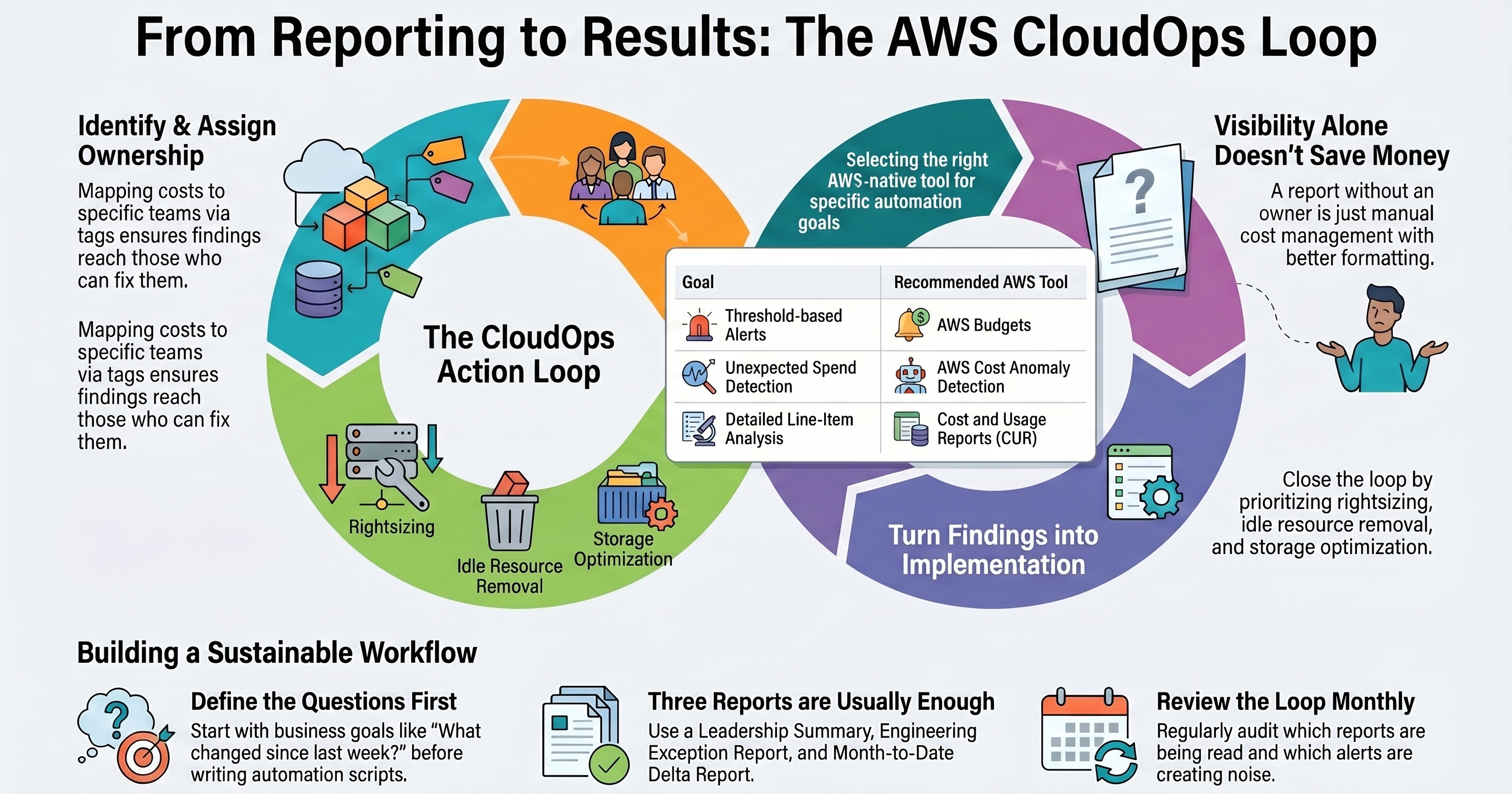
AWS Cost Explorer automation can help, but only if it feeds a real operating loop. Scheduled reports, API-driven summaries, and alerts are useful. They do not reduce spend by themselves. The value comes when the data turns into owner-backed work: identify the change, route it to the right team, pick the right AWS tool, prioritize the fix, implement it safely, and check whether the problem stays solved.
For lean AWS teams, the goal is not another dashboard. The goal is a cost-control rhythm that engineering, finance, and leadership can actually use.
What AWS Cost Explorer automation usually means
When teams search for AWS Cost Explorer automation, they usually want one of a few things.
The first is scheduled cost reporting. A weekly or monthly report shows spend by service, linked account, tag, environment, project, or business unit. This is often the first useful step because it replaces one-off console checks with a consistent view. The internal ask is usually simple: “Can we automate AWS cost reports so nobody has to rebuild this spreadsheet every week?”
The second is API access. Teams use the AWS Cost Explorer API to answer recurring questions: What changed compared with last week? Which service drove the increase? How much has this account spent month to date? Which tagged workloads have no clear owner? Many AWS Cost Explorer API examples use Python, boto3, Lambda, and EventBridge to run scheduled queries and route summaries to email, Slack, or a ticketing system.
The third is alerting. AWS Budgets and AWS Cost Anomaly Detection are often better fits than a custom Cost Explorer script when the main need is a threshold or anomaly signal. Budgets can handle expected spend boundaries. Cost Anomaly Detection can flag unexpected changes and notify the right channel.
The fourth is the part many tutorials skip: implementation. Cost reporting is useful, but savings come from follow-through. That might mean tagging cleanup, non-production schedules, idle resource removal, rightsizing, storage lifecycle work, Savings Plans or Reserved Instance review, guardrails, or stronger owner accountability.
A good AWS cost optimization automation setup usually combines those layers. It uses the right AWS-native tool for each job and connects reporting to action.
What the AWS Cost Explorer API can automate
The AWS Cost Explorer API lets teams query cost and usage data programmatically instead of relying only on the console.
Common automation patterns include:
- Daily or weekly spend by AWS service.
- Month-to-date cost compared with the prior month or prior week.
- Spend grouped by linked account, tag, cost category, region, or usage type.
- Forecast snapshots for leadership or finance.
- Reservation and Savings Plans utilization or coverage views.
- Resource-level cost checks where supported and enabled.
A simple version might be a scheduled Lambda function that uses boto3 to call Cost Explorer, summarize the results, and send a short Monday morning report. For teams looking for AWS Cost Explorer API examples, AWS Cost Explorer boto3 patterns, or AWS Cost Explorer Python examples, that is usually enough to start: one scheduled query, one summary, one owner for follow-up.
Another team might use the API for a daily engineering exception report. Instead of listing every cost, the report only shows services with a meaningful week-over-week increase, untagged spend, or account-level deltas above a defined threshold.
The best Cost Explorer API examples start with the decisions the report needs to support.
Useful questions include:
- Which cost changed enough to need attention?
- Which team, product, account, or environment owns it?
- Is the increase expected because of growth, launch activity, migration, or testing?
- Is it a one-time anomaly or a recurring pattern?
- What action should happen next?
Without those questions, a team can build a report that looks polished and still creates no accountability.
There are also operational details to handle. Cost Explorer API access requires the right IAM permissions, and the data exposed depends on the account and organization setup. API requests can have request-level pricing, so scripts should be scoped carefully instead of querying every possible grouping on a tight loop. AWS recommends using SDKs where available, and teams should verify current AWS pricing before estimating costs or designing high-volume reporting loops.
When Cost Explorer automation is not the right tool
Cost Explorer is good for targeted cost and usage questions. It is not always the right automation layer.
If the need is “tell me when spend crosses a threshold,” AWS Budgets may be simpler than a custom Cost Explorer report. If the need is “detect unusual spend behavior,” Cost Anomaly Detection may be a better fit. If the need is “analyze every line item in a warehouse,” AWS Cost and Usage Reports / Data Exports are usually the better foundation.
| Need | Better AWS-native fit |
|---|---|
| Scheduled budget thresholds and forecasted alerts | AWS Budgets |
| Unexpected spend changes and adaptive alerting | AWS Cost Anomaly Detection |
| Detailed line-item exports for warehouse, Athena, or BI analysis | AWS Cost and Usage Reports / Data Exports |
| Consolidated optimization recommendations | AWS Cost Optimization Hub and AWS Compute Optimizer |
| Executive dashboards and FinOps reporting | CUDOS / Cloud Intelligence Dashboards, QuickSight, or a FinOps platform |
| Implementation follow-through | Internal CloudOps team, implementation sprint, or Fractional CloudOps partner |
Most AWS teams end up with a blend: Cost Explorer for focused questions, Budgets and Anomaly Detection for alerts, Cost and Usage Reports for deeper analysis, and CloudOps ownership for implementation.
SkySaver’s view is practical. AWS-native tools are valuable, but they do not replace an operating model. The team still needs clear ownership, clean tags, safe implementation, and a cadence for deciding which recommendations actually get shipped.
If this sounds familiar, useful AWS cost data but unclear ownership and limited time to act, that is exactly the gap a SkySaver AWS CloudOps Diagnostic is designed to clarify.
A lightweight AWS Cost Explorer automation workflow
A good automation workflow does not need to start with a large platform rollout. For many startups and lean platform teams, the first version should be small, understandable, and tied to action.
1. Define the cost questions before writing scripts
Start with the questions that matter to the business and the engineering team.
Examples:
- What changed since last week?
- Which service, account, tag, or environment is driving the increase?
- Which spend has no clear owner?
- Which non-production resources are still running outside expected hours?
- Which costs are recurring but no longer tied to active work?
- Which optimization recommendation is safe enough to implement this month?
This keeps automation focused. Otherwise, the team may create a large report that nobody reads.
2. Start with a few scheduled reports
For most teams, three reports are enough to start.
A weekly leadership summary can show total spend, major changes, and top drivers. A daily or twice-weekly engineering exception report can flag unusual increases or missing ownership. A month-to-date delta report can group spend by account, service, project, or environment.
Keep these reports short. The point is not to recreate the AWS console in an email. The point is to show what changed, why it matters, and who should look next.
3. Route reports to owners instead of inboxes
AWS cost reporting often fails because reports go to a general inbox or a single finance stakeholder. Engineering usually owns the root causes: architecture choices, idle resources, environment schedules, storage policies, data transfer, and deployment patterns.
Good automation maps costs to owners using accounts, tags, services, projects, or environment conventions. If ownership is unknown, treat that as a finding. “Untagged” or “unknown owner” spend signals an operational control gap, not a mere reporting issue.
4. Add alerting after ownership is clear
Alerts work best when someone knows what to do with them. Before adding many thresholds, define routing and response expectations.
Use AWS Budgets for expected spend boundaries. Use AWS Cost Anomaly Detection for unexpected changes. Use Slack, email, SNS, or ticketing integrations where they fit the team’s workflow.
The goal is not to alert everyone about every change. The goal is to create a manageable signal that reaches the person or team most likely to understand and fix the issue.
5. Turn findings into implementation work
This is where cost visibility becomes cost control.
Common implementation actions include:
- Adding non-production schedules for EC2, RDS, Lambda-adjacent workflows, and Auto Scaling patterns where appropriate.
- Cleaning up tags and ownership rules.
- Removing idle or orphaned resources.
- Rightsizing compute and database resources.
- Reviewing Savings Plans or Reserved Instance coverage.
- Improving storage lifecycle rules.
- Adding guardrails and runbooks so the same issue does not come back.
For overloaded teams, this is usually the hard part. The report may be easy to automate. The implementation backlog has to compete with product delivery, incidents, migrations, hiring, and security priorities.
A focused Implementation Sprint can help turn the first round of findings into reports, alerts, tagging cleanup, schedules, guardrails, and handoff documentation without forcing the internal team to pause core product work.
6. Review the loop monthly
Once a month, review the automation itself.
Ask:
- Which reports were actually read?
- Which alerts were noisy?
- Which findings turned into shipped fixes?
- Which costs reappeared after being fixed?
- Which tags, accounts, or ownership rules need cleanup?
- Which dashboards or reports should be simplified or retired?
A lightweight monthly review keeps cost automation from becoming shelfware.
Common mistakes when automating AWS cost reporting
AWS Cost Explorer automation is easy to start. It is also easy to point in the wrong direction.
Building reports before defining decisions
A report should support a decision. If the report does not change what anyone does, it is probably too broad, too frequent, or routed to the wrong audience.
Grouping only by service
Service-level reports are useful, but they rarely answer ownership questions. “EC2 increased” is less actionable than “staging EC2 spend for Project A increased after a test environment was left running.” Use account, tag, project, environment, and owner mapping where possible.
Ignoring tagging and account structure
Automation cannot fully compensate for unclear ownership. If tags are inconsistent and accounts are poorly separated, reports will produce vague findings. Tagging and account cleanup may be the highest-value first step.
Treating anomaly alerts as an implementation plan
An anomaly alert says something changed. It does not decide whether the change is expected, assign the owner, evaluate the fix, or implement it safely.
Making finance the only audience
Finance needs the narrative, but engineering often owns the root cause. The best reporting loop gives leadership a clear summary and gives engineering a specific action path.
Buying a platform before fixing the operating model
FinOps platforms can be useful, especially as complexity grows. A larger AWS cost optimization dashboard may help leaders see patterns faster. But if the team has no owner mapping, no review cadence, no implementation capacity, and no tagging discipline, the dashboard mostly makes the unresolved work easier to see.
Where Fractional CloudOps helps turn reports into fixes
Many AWS teams can write a Cost Explorer script. Fewer teams have the spare capacity to turn cost visibility into a repeatable CloudOps motion.
That is where Fractional CloudOps support can help. Instead of hiring a full-time senior CloudOps or FinOps lead immediately, a team can bring in targeted AWS expertise to design the loop, prioritize the backlog, and help implement the highest-value changes.
For SkySaver, that usually starts with an AWS CloudOps Diagnostic. The diagnostic maps current cost visibility, reporting gaps, ownership issues, tagging problems, and high-confidence waste or optimization opportunities. From there, the next step may be internal execution, a fixed-scope Implementation Sprint, or ongoing Fractional CloudOps support.
A SkySaver Implementation Sprint can help build or improve the automation and control loop: Cost Explorer scripts, AWS Budgets or Cost Anomaly Detection setup, reporting cadence, tagging cleanup, non-production schedules, cleanup automation, guardrails, and handoff documentation.
Fractional CloudOps is the recurring option for teams that need senior AWS guidance without full-time headcount. The cadence can include review, prioritization, implementation support, and leadership-ready reporting so cloud cost issues do not keep reappearing after each one-time cleanup.
The important distinction is that SkySaver is not another dashboard. The value is implementation-minded AWS cost optimization: turning reports into owner-backed work that improves the environment.
Practical examples of AWS cost optimization automation
Here are a few automations that can come out of a Cost Explorer review.
Weekly leadership cost summary
A scheduled report shows month-to-date spend, forecast, top service changes, and the most important cost drivers. The summary is written for decision-makers as well as AWS operators.
Engineering exception report
A daily or weekly report flags unusual increases by account, service, tag, or environment. Each item includes an owner or marks ownership as unknown.
Untagged spend report
A Cost Explorer query groups spend by key tags and calls out usage that is missing required cost allocation tags. The action is not “review the report” and move on. The action is to fix tagging standards and enforcement.
Non-production runtime review
Reports identify recurring non-production spend outside expected working hours. The implementation work may include schedules, shutdown automation, or updated environment ownership rules.
Monthly optimization backlog
Cost Explorer, Cost Optimization Hub, Compute Optimizer, and internal context feed a short monthly backlog. The team selects a small number of fixes that are safe, valuable, and realistic to ship.
FAQ
Can AWS Cost Explorer reports be automated?
Yes. Teams commonly automate AWS Cost Explorer reports using the AWS Cost Explorer API, AWS SDKs such as boto3, scheduled Lambda functions, EventBridge, email, Slack, or internal reporting workflows. The useful question is who owns the follow-up after the report runs.
Does AWS Cost Explorer have an API?
Yes. AWS provides a Cost Explorer API that can query cost and usage data programmatically. Common operations include cost and usage queries, forecasts, reservation and Savings Plans utilization or coverage views, and related cost management data. Check AWS documentation for the current API surface and permissions.
How much does the Cost Explorer API cost?
AWS Cost Explorer API requests may have request-level pricing. Verify current AWS Cost Explorer pricing before estimating costs or building high-volume automation.
Should I use Cost Explorer or AWS Cost and Usage Reports?
Use Cost Explorer for targeted cost and usage questions, forecasts, and grouped summaries. Use AWS Cost and Usage Reports when you need detailed line-item data exported to S3 for Athena, warehouse, BI, or deeper FinOps analysis. Many teams use both.
Should I use Cost Explorer or AWS Budgets?
Use Cost Explorer to investigate and summarize cost and usage patterns. Use AWS Budgets for budget thresholds, actual or forecasted alerts, and simple spend boundaries. If your main need is alerting against a budget, Budgets may be the better first tool.
Can Cost Explorer send email or Slack reports directly?
Cost Explorer itself is not usually the full workflow for custom email or Slack reporting. Teams often use the Cost Explorer API with Lambda, EventBridge, SNS, email, Slack webhooks, or ticketing integrations to route scheduled summaries.
What is the best way to automate AWS cost alerts?
Start with ownership and thresholds. AWS Budgets is a strong fit for known spend boundaries. AWS Cost Anomaly Detection is useful for unexpected changes. Custom Cost Explorer automation can supplement those tools with context, grouping, and reporting.
Is Cost Explorer enough for AWS cost optimization?
Cost Explorer is a useful visibility tool, but it is not enough by itself. Cost optimization also requires ownership, tagging, architecture judgment, implementation capacity, guardrails, and recurring review. Reports show where to look; CloudOps work turns findings into durable fixes.
When should a team bring in Fractional CloudOps help?
Fractional CloudOps makes sense when AWS spend and complexity matter, but the internal team is too overloaded to build the reporting cadence, prioritize fixes, and implement changes consistently. It is especially useful when cost issues are tied to ownership, tagging, architecture, migration, governance, or recurring operational backlog.
Conclusion: automate the loop around the report
AWS Cost Explorer automation is a good first step for teams that want better cost visibility. Automated reports can replace manual console checks. API scripts can answer recurring questions. Alerts can help teams respond faster.
The bigger value is the loop around the report: ownership, prioritization, implementation, and review.
If Cost Explorer is telling you something is wrong but your team does not have time to turn reports into fixes, SkySaver can help. Start with a SkySaver AWS CloudOps Diagnostic to identify the highest-confidence cost and operational improvements. Then decide whether the right next step is an Implementation Sprint, internal execution, or ongoing Fractional CloudOps support.
Ready to turn AWS cost reports into action? Schedule a SkySaver AWS CloudOps Diagnostic and get a practical view of where automation, ownership, and implementation can reduce recurring AWS waste without adding another dashboard nobody uses.